

 Security researchers have uncovered an active malvertising campaign abusing a fake ad‑blocking extension that intentionally crashes Google Chrome and Microsoft Edge to trick users into executing malicious commands—a new evolution of the ClickFix technique known as “CrashFix.” Read the Cybersecurity Threat Advisory now to reduce your risk.
What is the threat?
CrashFix is a browser‑level social‑engineering attack leveraging:
- Malicious browser extensions
- Induced browser instability
- Clipboard manipulation
- User‑triggered command execution
The campaign is attributed to KongTuke, a financially motivated threat group active since 2025 and associated with traffic distribution systems, malware loaders, and ransomware‑related initial access.
Unlike older ClickFix variants that relied on simulated error messages, CrashFix creates an actual browser crash, making the deception more credible.
Infection chain overview
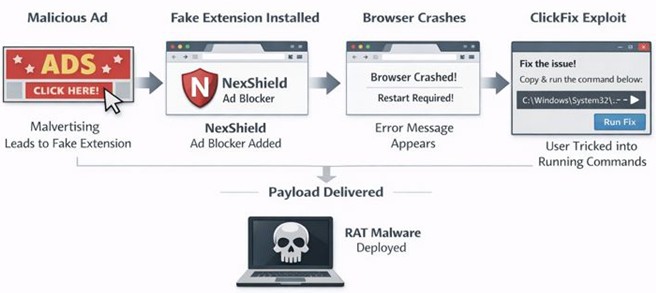
- Initial access: Users searching for ad blockers are redirected via malicious ads to install the NexShield extension, which impersonates uBlock Origin and falsely cites its developer.
- Delayed activation: The extension stays inactive for ~60 minutes to avoid suspicion.
- Browser Denial‑of‑Service: NexShield creates an infinite loop of chrome.runtime port requests, overwhelming system resources and causing Chrome or Edge to freeze or crash.
- CrashFix social engineering: After restart, a fraudulent security alert claims the browser “stopped abnormally” and recommends a manual “scan” or “fix.”
- ClickFix execution: The extension silently copies a malicious PowerShell or CMD command to the clipboard and instructs users to run Win+R → Ctrl+V → Enter, unknowingly executing the payload themselves.
- Payload delivery: Domain‑joined systems receive ModeloRAT, which provides remote control, persistence, and reconnaissance. Non‑domain systems typically receive incomplete test payloads, indicating enterprise‑focused targeting.
CrashFix/ClickFix attack timeline:
Affected products and versions
- Google Chrome | All current versions | Exploitation via malicious extension
- Microsoft Edge | All chromium-based browsers | Same extension codebase
- Windows Endpoints | Domain-joined systems | Primary payload targets
- Chrome Web Store | No affected versions | Malicious extension hosted briefly
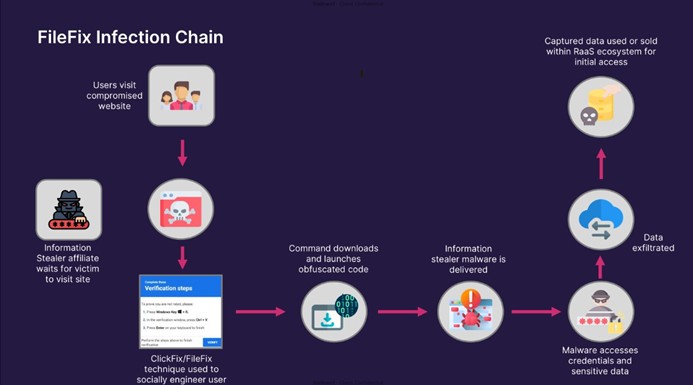
Infection cycle methodology
Why is it noteworthy?
- Real technical failure as a lure: The browser genuinely crashes, making the social‑engineering prompt far more convincing.
- Legitimate store abuse: The malicious extension briefly bypassed Chrome Web Store reviews.
- User‑executed payloads: By tricking users into running commands themselves, the attack evades many traditional security controls.
- Enterprise targeting: Full payloads are reserved for domain‑joined systems, suggesting intent for lateral movement and corporate compromise.
- Initial-access enablement: KongTuke has a history of enabling ransomware operators through initial‑access services.
What is the exposure or risk?
Organizations face increased risk due to the blend of trusted‑source abuse, human interaction, and stealthy execution:
- Full endpoint compromise: ModeloRAT offers remote command execution, persistence, and secondary payload deployment.
- Telemetry evasion: Clipboard‑based execution bypasses many web, email, and endpoint filters.
- Credential theft & lateral movement: Compromised domain‑joined systems can expose AD credentials and internal assets.
- Ransomware enablement: Infected hosts may be resold or repurposed by ransomware operators.
- User trust erosion: Abuse of ad‑blocking tools undermines confidence in “trusted” browser extensions.
- Recurring infection loop: If NexShield remains installed, the crash‑and‑prompt cycle repeats every 10 minutes, increasing user compliance.
- Scalable exploitation: Attackers can automate outreach to large numbers of users, increasing the chance of opportunistic compromise.
What are the recommendations?
Barracuda recommends the following actions to limit the impact of CVE-2025-8110:
Immediate actions
- Remove NexShield or any unfamiliar browser extensions.
- Conduct full system malware scans; removing the extension does not remove deployed payloads.
- Isolate affected endpoints from the network.
Preventive controls
- Restrict browser‑extension installation through enterprise policies.
- Monitor or block clipboard abuse and command‑line execution from user context.
- Limit or disable access to Windows Run, PowerShell, and CMD where feasible.
User awareness
- Train users that no legitimate browser fix requires pasting commands into Windows terminals.
- Reinforce caution when installing extensions—even from official stores.
Monitoring & detection
- Alert on forced browser restarts followed by unusual command‑line activity.
- Hunt for legitimate tools (e.g., finger.exe) being used for payload retrieval or staging.
References
For more in-depth information about the recommendations, please visit the following links:
- BleepingComputer – Fake ad blocker extension crashes the browser for ClickFix attacks [bleepingcomputer.com]
- SecurityWeek – Malicious Chrome Extension Crashes Browser in ClickFix Variant “CrashFix” [securityweek.com]
- CSO Online – CrashFix attack hijacks browser failures to deliver ModeloRAT malware [csoonline.com]
- TechRadar Pro – Fake Chrome extensions crash browsers to sneak in malware [techradar.com]
- Malwarebytes – Fake extension crashes browsers to trick users into infecting themselves [malwarebytes.com]
- Huntress – Dissecting CrashFix: KongTuke’s New Toy [huntress.com]
- Microsoft Security – Analyzing the ClickFix social engineering technique [microsoft.com]
If you have any questions about this Cybersecurity Threat Advisory, don’t hesitate to get in touch with Barracuda Managed XDR’s Security Operations Center.

This post originally appeared on Smarter MSP.