

 Security researchers discovered a malicious Visual Studio Code (VS Code) extension named “ClawdBot Agent” impersonating the trending AI assistant Clawdbot. Although it offers functional AI coding features, the extension secretly deploys a weaponized remote access tool on Windows systems immediately when VS Code launches. Review this Cybersecurity Threat Advisory now for recommendations to secure your environment.
What is the threat?
This attack represents a supply‑chain–style compromise delivered through a malicious VS Code extension. Once installed, ClawdBot Agent executes code during VS Code startup, retrieves attacker‑controlled configuration files, and installs a trojanized ScreenConnect remote administration client—granting ongoing interactive access to the victim machine.
VS Code extensions run with full user permissions and lack sandboxing, allowing attackers to access files, credentials, source code, and internal network resources while blending in with normal developer activity.



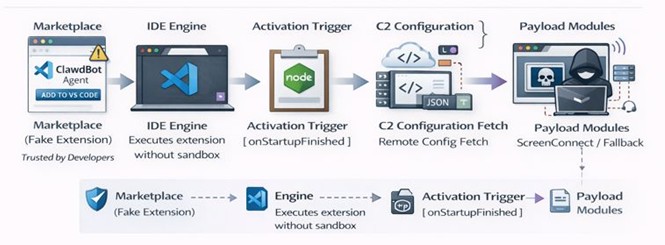
Infection chain overview
- Initial Access – Users install the malicious “ClawdBot Agent” VS Code extension. It is professionally branded, functional, and impersonates a trending AI tool, making it appear authentic.
- Automatic Activation – The extension triggers on the onStartupFinished event, running every time VS Code opens with no user interaction required.
- Hidden Initialization – A malicious routine executes before any visible AI functionality loads, ensuring early and silent execution.
- C2 Configuration Retrieval – The extension downloads a remote config.json from attacker infrastructure. Exceptions are suppressed to avoid generating logs or alerts.
- Payload Staging – Based on the retrieved config, the extension downloads multiple binaries disguised as common VS Code/Electron/Chromium components.
- Payload Execution – These binaries install a trojanized ScreenConnect client, granting full remote access to the system.
Affected products and versions
| Product | Affected version(s) | Platform | Impact |
|---|---|---|---|
| Visual Studio Code | All versions supporting extensions | Primarily Windows (DLL‑based payloads) | Arbitrary code execution & remote access |
| VS Code Extension | “ClawdBot Agent” (malicious) | Single codebase | RAT deployment via trojanized ScreenConnect |
Infection cycle methodology
Why is it noteworthy?
This campaign highlights how trusted developer tools are increasingly abused for initial access:
- The extension appears legitimate, lowering suspicion.
- No software exploit is required.
- Malicious code runs automatically at IDE startup.
- Attackers repurpose legitimate remote‑access software to evade detection.
- Signature‑based defenses provide limited protection.
High‑value target surface: Developer machines often contain source code, secrets, CI/CD access, and production credentials—making compromise highly valuable.
Marketplace abuse: The extension briefly passed VS Code Store controls, underscoring the ongoing risks of “trusted” extension ecosystems.
What is the exposure or risk?
Organizations that allow unrestricted IDE extension installs face elevated exposure—especially where developer workstations lack full EDR/XDR monitoring.
Potential impacts include:
- Persistent unauthorized remote access
- Source code and IP theft
- Credential harvesting (API keys, cloud tokens, secrets)
- Lateral movement within internal networks
- Supply‑chain compromise of downstream software projects
What are the recommendations?
Barracuda recommends the following actions to limit your impact:
Immediate actions
- Remove the “ClawdBot Agent” extension and any unapproved VS Code extensions.
- Run full system scans using Barracuda Endpoint Security; removing the extension does not remove deployed payloads.
- Isolate affected endpoints from the network.
Preventive controls
- Enforce extension allow‑listing using enterprise device management or developer workstation policies.
- Restrict and monitor usage of remote‑administration tools (e.g., ScreenConnect) to approved IT workflows only.
- Limit unnecessary access to PowerShell, CMD, and other execution surfaces where feasible.
Monitoring & detection
- Alert on unusual outbound connections originating from IDE processes (e.g., code.exe, Node.js child processes).
- Hunt for unauthorized use of legitimate remote‑access tools outside approved support timelines.
Barracuda’s detection in place
The following STAR custom rules are deployed as an additional detection layer in SentinelOne by our Endpoint Security Team, complementing S1’s default rules and content updates. These rules focus on high-signal attacker behaviors such as exfiltration staging, suspicious remote tool activity, credential dumping patterns, and download-and-execute chains.
| Rule | Description | Generic detection logic (brief) |
| Data exfiltration (command-line pattern) | Detects command-line activity suggesting bulk document discovery or staging prior to exfiltration. | Triggers on process creation where command-lines reference multiple document extensions and repeated include/exclude patterns, while excluding known benign applications to reduce false positives. |
| ScreenConnect – suspicious TLD DNS | Identifies ScreenConnect-related DNS activity to high‑risk or commonly abused TLDs. | Alerts when ConnectWise/ScreenConnect processes resolve domains under suspicious TLDs, excluding known benign domains and approved environments. |
| Potential data exfiltration (staging + transfer) | Detects common data staging and transfer workflows used for exfiltration. | Correlates file compression or bulk copying activity followed by outbound transfer behavior using commonly abused utilities. |
| Suspicious rename to EXE | Detects files being renamed to executable formats, a common evasion technique. | Triggers when a file is renamed to an executable extension, especially from user‑writable locations or following a download or archive extraction. |
| Credential dumping detection | Detects credential dumping activity using common LOL techniques. | Alerts on behaviors consistent with credential access or dumping, excluding high‑noise methods (e.g., Task Manager dumping) to reduce false positives. |
| Suspicious download and execution | Detects download‑and‑execute chains using LOLBins and scripting utilities. | Triggers when common parent processes spawn script or LOL binaries that perform download and execution‑related actions, with exclusions for known legitimate installers. |
References
For more in-depth information about the recommendations, please visit the following links:
- https://www.bleepingcomputer.com/news/security/malicious-ai-extensions-on-vscode-marketplace-steal-developer-data/amp/
- https://www.aikido.dev/blog/fake-clawdbot-vscode-extension-malware
If you have any questions about this Cybersecurity Threat Advisory, don’t hesitate to get in touch with Barracuda Managed XDR’s Security Operations Center.

This post originally appeared on Smarter MSP.